They Got Into Your Steam Account and You Had 2FA On. Here's Why Changing Your Password First Was the Wrong Move.
Session-token theft walks straight past Steam Guard, and changing your password on the infected machine just hands over the new one. The right order, and what won't come back.


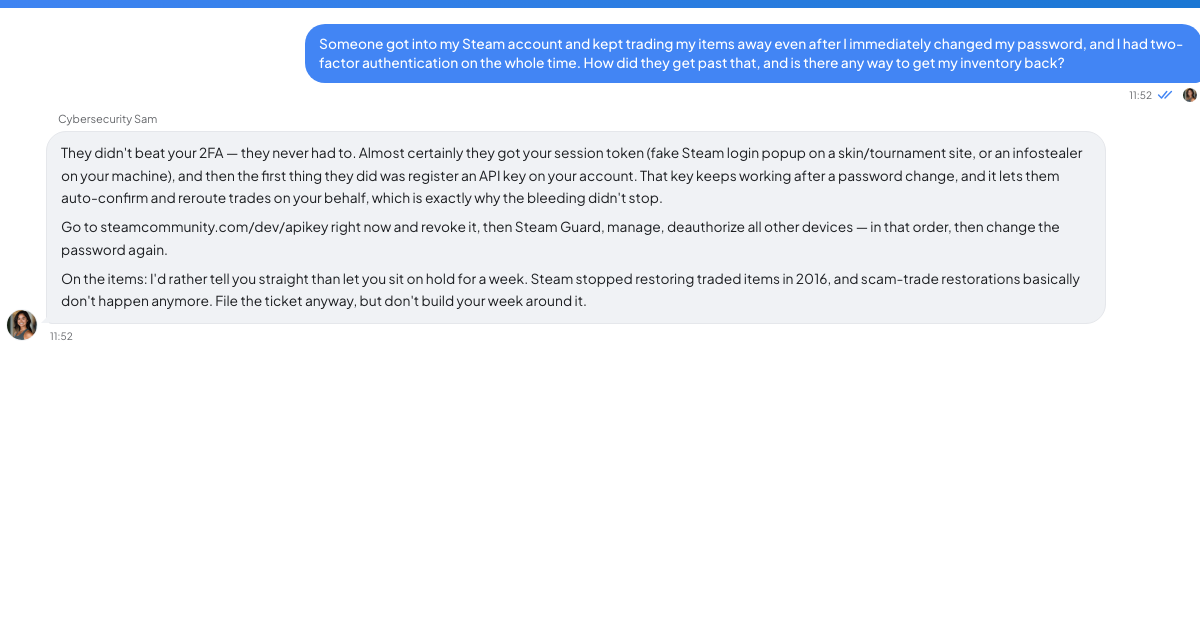
An hour after you changed the password, they were still in
The second trade goes out sixty minutes after the password change. Say that is how yours went, because that is usually how it goes: a six-year-old account, a few hundred dollars of inventory, thirty-odd dollars sitting in the wallet, and an email on file that is now some address you have never seen.
You did what everyone says to do. New password, straight away, from the desktop you were sitting at.
You had Steam Guard on the whole time.
What happened to you is a different attack from the one that advice was written for.
Nobody guessed your password
The thing that hurt you is probably an infostealer — a category of malware whose entire job is to be run once on a machine and hoover up whatever is already logged in. It collects browser cookies, saved passwords, crypto-wallet files and, specifically, the session tokens that games and chat clients keep on disk so you do not have to log in every morning.
A session token is the part people do not think about. It is not a password and it is not a code. It is proof, already issued, that somebody at this keyboard passed the login check earlier. Paste that token into another machine and the platform sees a session that has already cleared authentication. There's nothing left for two-factor to challenge. The gate was passed hours ago. The attacker walked in through a door you left open behind you.
Which is why Steam Guard did not save you, and why it is not useless either. It stops a completely different attack that also gets tried on you constantly. It just was not built for this one.
It is also why changing your password on the infected machine was the wrong first move. Some platforms do end every existing session when a password changes; some do not, and the behaviour shifts between versions. But that is the smaller problem. The bigger one is that if the thing is still resident, you just typed the new password into a machine the attacker controls.
Honest caveat: plenty of stealers are grab-and-go. Run once, exfiltrate, exit, no persistence. Yours might not be there any more. You cannot tell which kind you have from the outside, and a clean scan does not settle it.
The order that actually works
Do all of this from a different device — a phone, a friend's laptop, anything that was not there when you clicked the link.
1. The email account first. Everything else recovers through email. If they have already changed the Steam address, your email was almost certainly the first thing they took, and every step below can be undone by whoever still reads your inbox. Recover it, change the password from the clean device, then check for forwarding rules and filters they have added — the classic move is a rule that auto-deletes anything from Steam or Discord so you never see the notifications. Sign out all sessions on the email account too.
2. Clean or abandon the machine. Do not rely on a scan: a scan that comes back clean tells you the scanner did not recognise anything, and stealer builds get churned out faster than signatures get written. The only answer you can trust is a full wipe and reinstall of the operating system, from installation media, with your files backed up as data and nothing executable carried across. That is a miserable afternoon. It is also the only step that makes the rest of this stick, and skipping it is why people do the whole recovery twice.
3. Kill the sessions, before you rotate anything. Steam's current account-security guidance tells you to inspect Authorized Devices, use “Sign out everywhere” when anything looks wrong, change the Steam password, review the linked email account, and scan for malware. Steam has a deauthorize-all-devices control in the Steam Guard section of your account details, and Discord lists active sessions under its device settings. Find the current version of each yourself rather than following a two-year-old screenshot; these menus move. This is the step that actually evicts the person using your stolen cookie.
4. Now change passwords. Work from the clean device and make each password unique, stored in a password manager. If you reused that password anywhere else — and you probably did, on something old — those accounts are gone too, they just haven't been used yet.
5. Revoke API keys. This one gets missed, and it is why some people get robbed again a week after they think they are safe. A Steam Web API key registered on your account can be used to watch and interfere with trades even after you have taken the password back. Look at steamcommunity.com/dev/apikey and revoke anything sitting there that you did not create. Do the same sweep for connected apps and authorised third-party sites on both platforms.
6. Then file the support ticket. Filing first is instinctive, but it wastes the hours that matter, because while you sit in a queue the session is still live.
What you are not getting back
Assume the traded items are gone.
Steam's published support policy on restoring items lost in trades is not encouraging, and it is worth reading the current version yourself rather than taking a forum thread's word for it. But do not organise your week around getting your inventory restored. People spend a fortnight escalating a ticket, refreshing it hourly, writing longer and longer replies, and the answer they get on day fourteen is the answer they got on day one.
The account itself is usually recoverable. The wallet balance and the items usually aren't. Purchased games generally stay with the account, which is the one piece of good news in here.
How it got in, so it does not happen twice
It was almost certainly something you ran or somewhere you typed.
A message from a friend whose account was already taken, asking you to vote for their team in a tournament. A free key for a game that is not out. An invite to playtest an indie project, with a download attached. A page that looks exactly like the Steam login prompt, floating inside a browser window, which is not a browser window at all but a picture of one drawn by the page underneath.
The common shape: it arrives from someone you know, it is slightly urgent, and it asks for one small action. Same as every other confidence trick, just faster.
Cybersecurity Sam on TrueTalk is an AI you can throw the blast-radius question at while the ticket sits in a queue — what else was logged in on that box, what else used that password. It cannot run Steam's recovery flow. Only Steam can.
Your password was never the weak point and it will not be next time either. The weak point is that your machine holds proof-of-login for a dozen services, all day, in files, and any program you run can read them.
Which leaves one thing to do before you close this tab. Steam's trade-hold documentation says a hold can last up to 15 days; when the Mobile Authenticator has not protected the account for at least the previous 7 days, outgoing items may be held for up to 15 days. Canceling a held trade triggers a 7-day trading cooldown. Steam applies these holds when the mobile authenticator is not in the picture. If a hold caught anything that went out of your account, it is still in flight, and that hold is the only lever in this entire mess with a clock running on it.
Check pending or protected trades now, then continue through the clean-device recovery order above.